

_500x500.jpg)
『Krohne Flow Meter Ifc 300 Manual Guide: Diagnostic Webserver Setup for Advanced Process Electromagnetic Meters』Related information(clamp on meter|electromagnetic meter|venturi meterrotameter|orifice meter|ultrasonic flow meter|mass flow meter|coriolis mass flow meter|coriolis flow meter|magnetic flow meter|magmeter flow meter|magflow flow meter|mag meter flow meter|electromagnetic flow meter|vortex flow meter|turbine flow meter|thermal mass flow meter|thermal flow meter|rotameter flow meter)

Krohne Flow Meter IFC 300 Manual Guide: Diagnostic Webserver Setup for Advanced Process Electromagnetic Meters
Quick Answer: The IFC 300 diagnostic web server is reached by assigning a static IP address in the converter menu, connecting the RJ45 Ethernet service port to a laptop or plant LAN, and entering that IP address in a browser. The web pages show flow rate, totalizers, active errors, coil current, electrode resistance, and empty pipe status. You can use these pages for loop checks and remote diagnostics without opening the converter housing.
Why the Web Server Saves You a Site Visit
Many water and wastewater plants run electromagnetic flow meters in remote pits or underground vaults. A site visit to check one alarm can take half a day in countries like Vietnam, Oman, Peru, or Saudi Arabia. The IFC 300 diagnostic web server gives you a faster route. You connect once, verify the signal, read the error log, and decide whether the problem is process-related or instrument-related.
We have seen this on customer sites many times. The issue is often not the meter. It is a low conductivity fluid, a partially filled pipe, or a grounded liner. The web server shows empty pipe detection status and conductivity value. That single page can stop an unnecessary shutdown.
What the IFC 300 Web Server Shows
The IFC 300 web interface normally includes these values:
Flow rate and forward or reverse totalizer, active error messages with time stamps, coil current in mA, electrode resistance in kΩ, empty pipe detection status, converter temperature, and software version.
For a standard electromagnetic flow meter application the conductivity should be at least 5 µS/cm for water-based fluids. Electrode resistance below 10 kΩ often means coated electrodes or moisture inside the terminal box. Coil current outside the expected range can indicate a shorted coil cable or a converter board fault. These are field checks that an engineer can run from the control room if the web server is on the plant network.
Krohne IFC 300 Diagnostic Web Server Setup Steps
This is a generic setup sequence based on the IFC 300 handbook and field practice. Menu names can change by converter revision. Always check the Krohne IFC 300 manual for your exact software version.
Step 1. Open the converter display and go to Setup or Service. Find the communication submenu. Select Ethernet or web server configuration.
Step 2. Set a static IP address in the same subnet as your laptop or plant LAN. For a direct laptop connection use an IP like 192.168.1.10 for the converter and 192.168.1.20 for the laptop. Set the subnet mask to 255.255.255.0.
Step 3. Save the settings and connect an RJ45 cable to the Ethernet service port. Some IFC 300 versions require a crossover cable on older hardware. Most current laptops and switch ports handle auto MDIX.
Step 4. Open a browser and enter the converter IP address. The web server default port is usually 80. If the page does not load, check firewall rules and confirm the IP settings were saved after a power cycle.
Step 5. Log in with the user level assigned by the plant administrator. The service or engineer level shows more diagnostic data. The operator level shows flow rate and totalizers only.
Common Problems During Commissioning
Here is
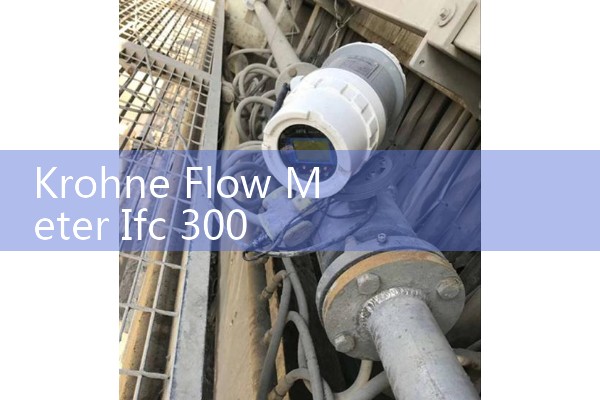
Another common issue is old firmware. Some IFC 300 converters shipped before 2012 need a firmware update to enable the full web server. If the web server option is greyed out, check the converter order code and confirm the communication option was installed. A paint manufacturer in Surabaya, Indonesia had this exact issue last year. The meter had Modbus RS485 enabled but not Ethernet. We supplied a replacement electromagnetic flow meter with Ethernet and 4-20 mA HART to avoid changing the PLC program.
Silver Automation Instruments Replacement Option
Silver Automation Instruments is an industrial flow meter manufacturer and supplier. We serve process plants and distributors in Southeast Asia, Oceania, Latin America, Africa, and the Middle East. Our electromagnetic flow meter range covers DN15 to DN2000, PTFE liner, 316L electrodes, 0.5 percent accuracy, 4-20 mA HART, pulse output, RS485 Modbus, and optional web diagnostics.
If your Krohne IFC 300 is obsolete, damaged, or too expensive to repair, send us your pipe size, flow range, pressure, temperature, and liner material. We will recommend a replacement electromagnetic flow meter with the same process connections and outputs. If you run a seawater desalination plant, state the salinity, flow rate in m3/h, and pipe size in DN. That detail helps us select the right seawater flow meter and liner.
FAQ
Can I set up the IFC 300 web server without a plant DCS? Yes. Use a laptop and a standard RJ45 Ethernet cable. Assign a static IP address in the IFC 300 converter menu and enter that IP in a browser. You do not need the DCS or PLC online.
What is the default IP address for the Krohne IFC 300 web server? The default IP depends on the firmware and order option. For a used unit, check the C5 or E2 communication menu on the display. If the IP is not visible, connect via the local display and read the network parameters in the service menu.
Which diagnostic values help identify a faulty electromagnetic flow meter? The most useful values are coil current, electrode resistance, empty pipe status, and active error list. A stable flow signal with normal coil current and high electrode resistance usually points to a process or installation problem, not a meter fault.
Can Silver Instruments supply a replacement for a Krohne IFC 300 electromagnetic flow meter? Yes. We supply electromagnetic flow meters with the same liner materials, electrode materials, process connections, and output signals. Contact us with your pipe size in DN, flow range in m3/h, pressure in bar, and fluid temperature in °C.
Does Silver Automation Instruments offer web server diagnostics on its own electromagnetic flow meters? Yes. We offer optional Ethernet web server diagnostics, RS485 Modbus, 4-20 mA HART, and pulse output on our advanced process electromagnetic flow meters. These options help you monitor flow data from the control room or a remote browser.
Contact Silver Automation Instruments for a quote. Tel: +86-25-68650347. WhatsApp: +86-25-52155837. WeChat: +86 15365082610. You can also visit flow-meter.com.au for product details.
 Hot Product
 Related AD